


Open the top-right Settings gear → Audio / MIDI. Sound Bank selection is also inside Settings.
The Audio / MIDI panel controls the devices Stage Arranger uses for live performance.
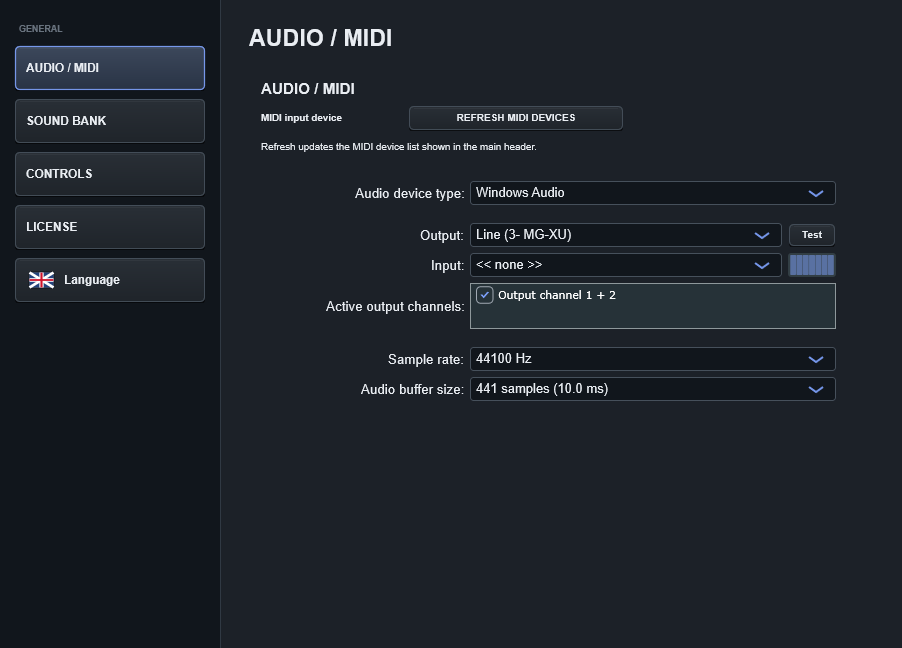
Audio output
Select the audio device, output channels, sample rate and buffer size appropriate for your system. A lower buffer reduces keyboard latency but increases CPU pressure; a higher buffer is safer when the computer is under load.
ASIO
When your audio interface provides a reliable ASIO driver, it is generally the preferred Windows path for low-latency live playing.
MIDI input
Choose the hardware MIDI keyboard you want Stage Arranger to listen to. Refresh the device list from Audio / MIDI after connecting a device that was not present when the program started.