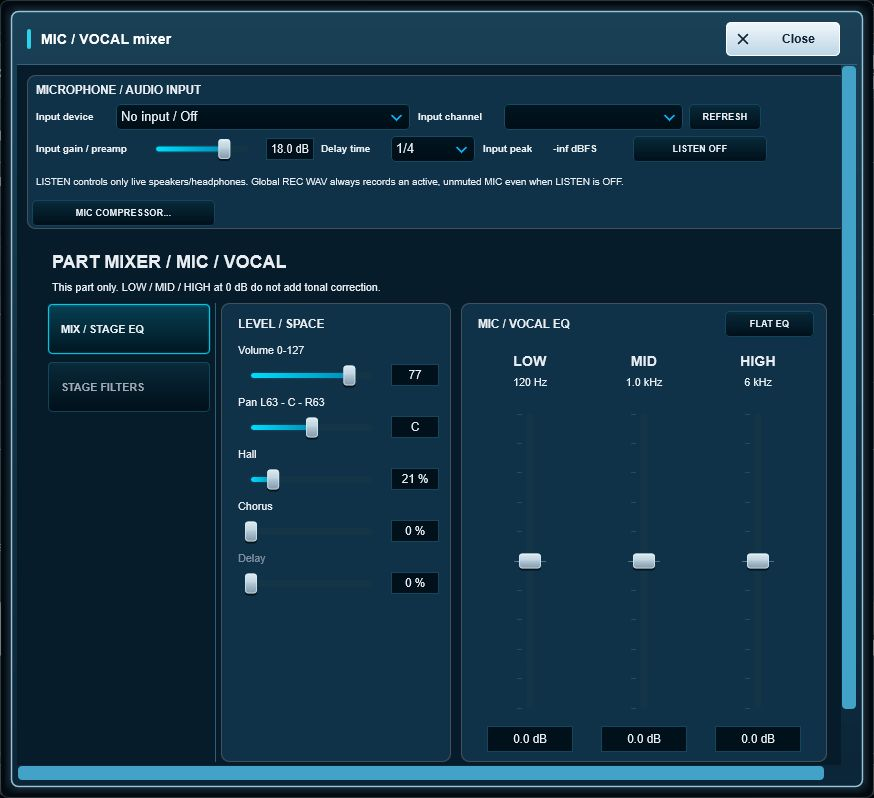
The MIC channel can use the current audio device input or a supported external input source. Its level and monitoring live beside the other mixer parts.
LISTEN
LISTEN controls whether the processed microphone is sent to the speakers/headphones. This is useful when avoiding acoustic feedback.
Effects
The vocal path provides channel processing including Hall, Chorus, Delay and Flanger. Use these as performance effects rather than relying on a separate vocal application during a set.
Input, gain and vocal compression
Open the MIC strip's gear. Choose the input device and physical channel, check the input meter, start with low gain and use headphones. Current audio device uses the main interface's input. REFRESH updates available inputs.
Input gain is software gain before processing; it does not enable phantom power or repair analogue clipping. The separate MIC/VOCAL compressor has ON/OFF, threshold, ratio, attack, release and makeup. It is independent of Master compression.
To exclude the microphone from REC WAV, mute MIC with M or disable its input. LISTEN OFF only removes live monitoring. If feedback occurs, turn LISTEN off immediately and check the microphone/speaker arrangement.