


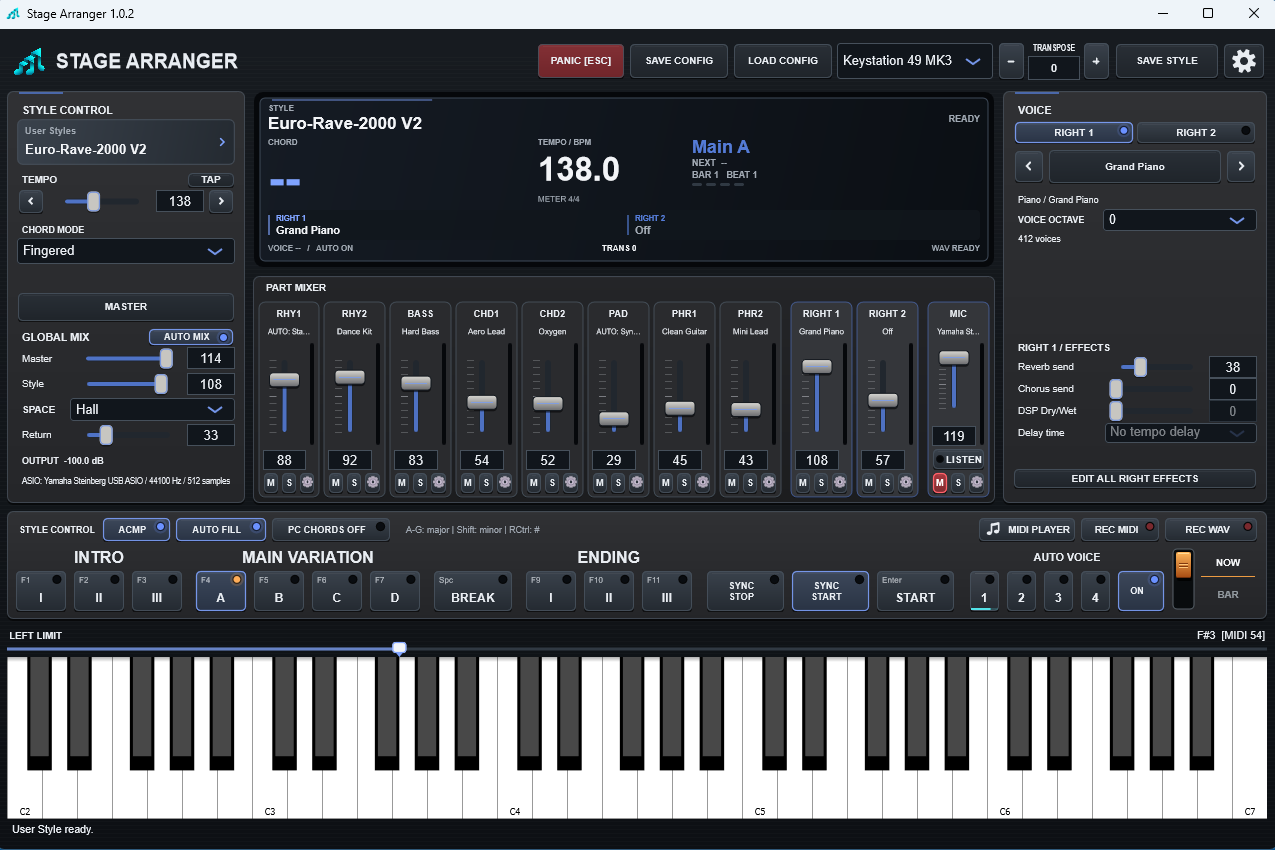
Computer-key shortcuts are intended as a convenience while Stage Arranger is the active foreground window. They are not accepted inside normal text-entry fields.
Performance keys
Esc- PANIC / hard silence.Enter- START / STOP.F1-F3- Intro I / II / III.F4-F7- Main A / B / C / D.SpaceorF8- Break.F9-F11- Ending I / II / III.
PC CHORDS mode
When PC CHORDS is enabled, A-G can act as chord letters for testing/playing from the computer keyboard. Modifier combinations provide minor/sharp variants as shown in the Stage Arranger interface.
PANIC is intentionally different from musical STOP. STOP allows natural release tails; PANIC is the emergency hard kill.
Assign computer keys and MIDI buttons
- Open Settings → CONTROLS. Select the separate control MIDI device if needed and refresh the list after connecting it.
- Click the assignment cell for a command. For a computer key, press an allowed key. For a MIDI button, press and release the same free button twice.
- A momentary CC button must send 127 on press and 0 on release. Continuous knobs, notes, pedals, pitch bend, musical controllers and MIDI Clock cannot be learned as command buttons.
- Resolve a duplicate with Replace or Cancel. X clears one assignment; Reset controls restores defaults after confirmation. Save keeps assignments.
Letters, arrows, Esc and modifier combinations are reserved. PC CHORDS is separate: A-G selects major chords, Shift adds minor, right Ctrl adds a sharp root. Shortcuts need the application in the foreground and do not run while typing in a text field.