


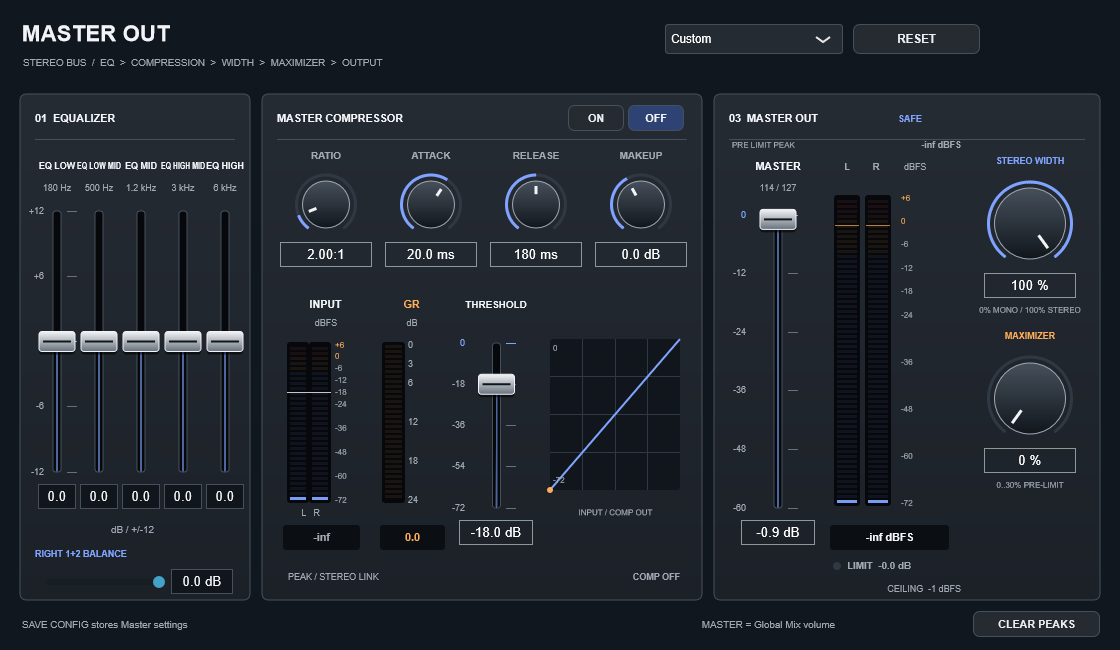
Open MASTER
Press MASTER in the left panel. The complete stereo mix passes through EQ → compressor → output level → safety limiter. Master processing is independent of Auto Mix.
| Control / setting | What it does |
|---|---|
| Five-band EQ | LOW 180 Hz, LO MID 500 Hz, MID 1.2 kHz, HI MID 3 kHz, HIGH 6 kHz. Each fader sets gain in dB; 0 dB is neutral. |
| INPUT L / R | The level entering compression, in dBFS. Use this to set the threshold. |
| THRESHOLD | Compression begins above this level. Lower it if the input never reaches it. |
| RATIO | Compression strength. 1:1 means no compression; higher values reduce peaks more strongly. |
| ATTACK / RELEASE | How quickly compression engages and recovers, in milliseconds. |
| GR | Actual gain reduction in dB. Zero means no reduction at that instant. |
| MAKEUP | Post-compression gain, −12 to +18 dB. It recovers level but does not push the compressor input harder. |
| MASTER | The same volume as Master in GLOBAL MIX. Here 0 dB corresponds to 127; about −6 dB corresponds to 64. The bottom position is silence. |
| OUTPUT / LIMIT | Final stereo level and limiting indication. The safety ceiling is −1 dBFS sample peak; avoid constant limiting. |
Bring a quiet mix forward
- Play a representative loud section and watch INPUT.
- Enable compression, lower THRESHOLD below the peaks to control and raise RATIO gently.
- Watch GR and listen while adjusting attack and release.
- Use MAKEUP to recover level, then MASTER to set final output.
- Check the loudest variation together with live RIGHT voices. Reduce makeup if limiting is continuous.
Global Master is after the compressor: turning it up does not increase compression. Makeup and final volume have different jobs.
Presets, Custom and Reset
Presets are starting points; Custom recalls your manual processing settings during the session. RESET puts five EQ gains and makeup at 0 dB, ratio at 1:1 and threshold at 0 dBFS, disables compression and clears meters. Attack becomes 10 ms and release 100 ms: time parameters need valid values, not artificial zeroes. The shared Master volume stays in place and the safety limiter remains. CLEAR PEAKS only clears meter peak holds.
SAVE CONFIG stores Master processing. SAVE STYLE does not.